How to fill out a pilot logbook: a complete guide
- Vinay Raibole

- 4 days ago
- 7 min read
A logbook looks complicated until someone explains what each column is for, and then it looks obvious. Much of the confusion in a new pilot's first hundred hours comes down to one gap: nobody walked them through the basics before they were handed the book and told to keep it current.
This is that walkthrough. It covers what every column holds, how to write your first entry, which times actually go in the book, whether you need to log every flight, and how much of the work a digital logbook can do for you. Wingman is used by 30,000+ pilots across 400+ airlines, and the way it fills entries from your roster is covered near the end. Everything before that applies to any logbook you keep, paper or digital.

What goes in each logbook column
Every logbook, paper or app, is built from the same handful of fields. The layout shifts between formats and regulators, but the information is consistent. Here is what each column holds.

Column | What it holds |
Date | The calendar date of the flight. |
Aircraft type | The make and model you flew, for example A320 or C172. |
Registration | The tail number of the specific airframe, for example VT-IXG. |
From / To | The departure and arrival airports, usually by ICAO or IATA code. |
Off / On blocks | The time the aircraft left its parking position and the time it arrived at the next one. |
Total time | The block time for that sector, the figure that builds your hours. |
Capacity | Whether you flew as pilot in command (PIC), second in command (SIC), dual, or solo. |
Day / Night | How the flight time splits between day and night. |
Instrument | Time flown by sole reference to instruments, actual or simulated. |
Takeoffs / Landings | Counted for currency, often split by day and night. |
Remarks | Free text for approaches, training detail, or anything you want on record. |
Two columns earn more attention than they usually get. Total time is the one that compounds, so an error there follows you for years and is the hardest to correct after the fact. Remarks is the one most new pilots underuse: a consistent note for the approach flown, the training covered, or the reason a sector was unusual turns a row of numbers into a record you can actually read back in five years.
The exact set of required fields is set by the authority that issued your licence. The FAA and EASA formats differ in wording and in how some columns are grouped, and the United States requirements for what must be recorded are laid out in FAR 61.51. If your format has a column you do not recognise, check your regulator's guide before guessing. A wrong assumption repeated across hundreds of entries is tedious to unwind.
Your first entry, step by step
Your first entry is the one most people overthink. Work through it in order and it takes about a minute.
Write the date first, then the aircraft type and registration, taken from the tech log or the aircraft itself. Add the departure and arrival airports. Record the off-blocks and on-blocks times, then the total time for the sector. Mark your capacity, count the landings, and note any night or instrument time. Finish with anything worth remembering in the remarks column, then save or sign. That is a complete entry. Everything after your first one is the same pattern repeated.
The single habit that saves the most trouble is entering each flight soon after it happens, while the times and detail are still fresh. A logbook you update the same day stays accurate. A logbook you reconstruct from memory weeks later does not.
Block time vs flight time
This is the distinction that trips up the most new pilots, because the two terms sound interchangeable and are not.

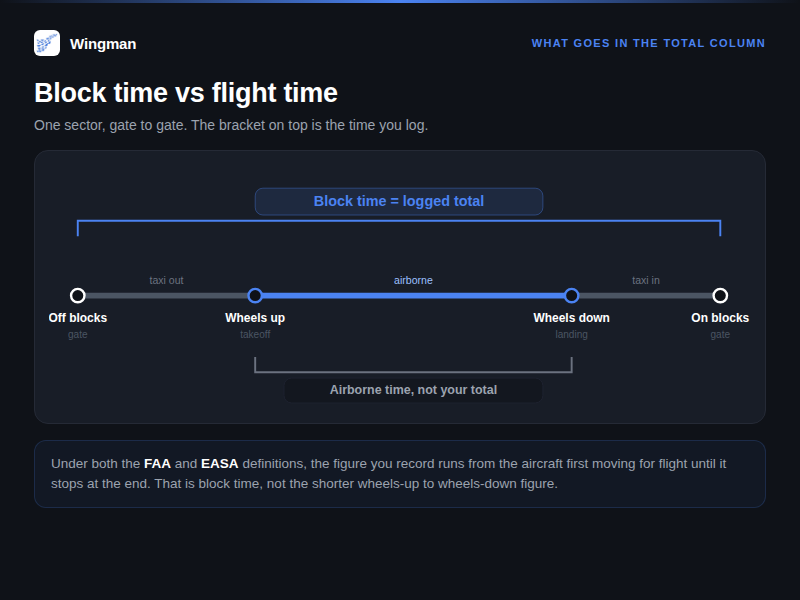
Block time runs from the moment the aircraft first moves under its own power for the purpose of flight until it comes to rest at the end. Gate to gate, including taxi. Airborne time is shorter: wheels-up to wheels-down only. The figure that goes in your total time column is block time.
Under both the FAA and EASA definitions, the loggable figure starts when the aircraft begins to move for flight and ends when it stops, which is the same as block time for a normal sector. If you record airborne time by mistake, every entry will read low, and that gap compounds across a career into a meaningful number of hours. When you are unsure, capture the off-blocks and on-blocks times, and let those two timestamps define the total. They are the reference your operator and your regulator both work from.
Do you log every flight
You are required to record the flights that count toward a certificate, rating, currency, or a flight review, and your regulator defines which those are. That is the floor.
In practice, the common habit is to log every flight you operate in a required capacity, because a complete record is easier to defend than a partial one, and because reconstructing missing entries later is painful. There are flights you may choose to leave out, for example a sector where you were purely a passenger. If you were operating the aircraft in a logged capacity, the safe habit is to write it down. A logbook that covers your whole flying history, with nothing skipped, is the one that answers questions cleanly when an employer, examiner, or insurer asks.
Currency is the practical reason the counts matter. Landings, night landings, and instrument approaches each carry their own recency windows, and a logbook that records them as they happen is what shows you are current when an operator or examiner checks. Leave those out and you can end up grounded on paper while perfectly current in the air.
Paper vs digital for a new pilot
Both work, and both are accepted. The real question is how much manual effort you want to carry over a career that will run for decades.

Paper logbook | Digital logbook | |
Setup | Buy it and start writing | Download and sign in |
Totals | Added by hand, easy to misadd | Calculated automatically |
Backup | One physical copy | Stored and synced across devices |
Roster entry | Typed in by you | Imported from your airline roster |
Regulator export | Re-copied into the required format | Exported in the format your authority wants |
Cost | Price of the book | Free tier, then a subscription |
Paper has a real appeal: it is simple, it needs no account, and a well-kept paper logbook is a satisfying object to hold. The cost is time and arithmetic. You add every total by hand, you re-copy entries whenever you need a different format, and a lost or water-damaged book is a genuine problem with no second copy.
A digital logbook removes the arithmetic and the re-copying, keeps a backup, and can pull most of each entry from your roster. For a pilot at the start of a career, where the hours accumulate for years, the time saved is the main argument. Some pilots keep both: paper for the keepsake, an app for the working record.
How an app fills most of it from your roster
Your roster already holds the data your logbook needs: the date, the route, the aircraft, and the times. A logbook that reads your roster can fill most of an entry before you touch it.
Wingman connects to the rostering systems airlines actually use, including AIMS eCrew, NavBlue RAIDO, CAE Crew Access, ARMS, CESAR, Sabre, FLICA, and PDC CrewConnex. Once connected, it pulls each flight, fills the date, sector, aircraft, and block times, and leaves you to confirm the entry and add anything the roster does not carry, such as the landings you made or a training remark. You can check the list of supported airlines, and the rest of what it does sits on the Wingman pilot logbook page.
It runs on iOS, Android, and the web as the same logbook on every device, so the record you build on your phone after a flight is the one you open on a laptop later. Because the import runs from the roster rather than from anything you type, the entry is only as good as the source data, which means you are checking figures rather than transcribing them. The free tier covers up to 250 hours, which carries a new pilot through training and into a first type rating. Past that, pricing is $59 per year internationally, or ₹4,499 per year in India.
Frequently asked questions
What goes in each logbook column?
Each row records one flight: date, aircraft type and registration, departure and arrival airports, off-blocks and on-blocks times, total time, your capacity, the day or night split, instrument time, landings, and remarks. The exact required fields depend on the authority that issued your licence.
How do I write my first entry?
Work top to bottom: date, aircraft, route, off-blocks and on-blocks, total time, capacity, landings, any night or instrument time, then remarks. Save or sign. Every later entry follows the same pattern, so the pace picks up straight after the first one.
What is the difference between block time and flight time?
Block time runs gate to gate, from the aircraft first moving for flight until it comes to rest. Airborne time is only wheels-up to wheels-down. The total time you log is block time, not the shorter airborne figure.
Do I log every flight?
You must record what counts toward a certificate, rating, currency, or flight review. Beyond that, the common habit is to log every flight you operate in a required capacity, because a complete record is easier to defend than a partial one.
Paper or digital, which should a new pilot use?
Both are accepted. Paper is simple but adds arithmetic and re-copying, and has no backup. Digital calculates totals, keeps a synced copy, and can fill most of each entry from your roster, which matters more as your hours grow.
Can an app fill the entries for me?
Yes, if it reads your roster. Wingman imports the date, route, aircraft, and block times from systems such as AIMS eCrew and NavBlue RAIDO, then leaves you to confirm the entry and add the rest.
Start with most of it already filled
You do not have to type a logbook by hand. Connect your roster and let Wingman fill the date, route, aircraft, and times for you, then confirm each entry in seconds. It is free up to 250 hours. Open the Wingman pilot logbook.


Comments