How to track recency and currency requirements automatically
- Vinay Raibole

- 3 days ago
- 8 min read
Recency sits underneath your licence and your medical, and unlike either of those it can lapse without warning. A licence carries a printed expiry. A medical carries a printed expiry. Recency carries neither. It moves every day against a rolling look-back window, and the only record that proves it is your logbook.
That is why currency lapses tend to be quiet rather than dramatic. Nobody sends you a final notice. The count simply ages out as the calendar advances, and the gap shows up at the worst possible moment: the day you are rostered to carry passengers and find the qualifying takeoffs and landings now sit outside the window. The cost is rarely a fine. It is a sector you cannot legally operate as planned, a roster line you have to hand back, and a requalification step before you can carry passengers again.
The complication is that recency is defined differently depending on who issued your licence. The FAA, EASA, and DGCA each set out their own look-back windows and applicable conditions, and the numbers do not transfer between them. This post documents the core rules across those three frameworks, explains why tracking them by hand against a logbook is error-prone, and shows how a digital logbook can carry the calculation for you.
Recency rules across FAA, EASA, and DGCA

Recency for carrying passengers is built on recent takeoffs and landings within a defined window. The window length and the conditions attached to it differ by regulator, so the first step is reading your own framework rather than the one a colleague trained under.
FAA: FAR 61.57
Under the FAA, FAR 61.57 requires three takeoffs and landings within the preceding 90 days to act as pilot in command carrying passengers. That is day currency. A separate night currency requirement applies within the same 90-day window, and it is satisfied independently of the day requirement, so meeting one does not meet the other.
Recency also follows category, class, and type. The qualifying takeoffs and landings have to be in an aircraft for which you hold the relevant rating, which means currency on one type does not carry across to another. A pilot can be day current on a single-engine type and not current on a multi-engine type at the same time.
EASA: FCL.060
Under EASA, FCL.060 requires three takeoffs and three landings within the preceding 90 days as pilot flying to act as pilot in command or as co-pilot carrying passengers. Two points are worth noting against the FAA rule. The requirement is framed around the pilot flying rather than the role title alone, and it explicitly reaches co-pilots carrying passengers, not just the commander.
The window length matches the FAA at 90 days, which is exactly why the two are easy to conflate. The conditions underneath the number are not identical, so a pilot who holds both an FAA and an EASA licence is tracking two separate states even when the headline figure looks the same.
DGCA: CAR Section 7, Series B, Part I
Indian operations fall under DGCA CAR Section 7, Series B, Part I, which sets out recency requirements for flight crew. The specific look-back window and the conditions attached to it should be read directly from the current CAR rather than assumed from the FAA or EASA figures, because the three frameworks do not share a single number. If you operate under the DGCA, the DGCA official portal holds the current regulation text, and our DGCA logbook requirements guide covers how the record itself needs to be kept.
The table below summarises the passenger-carrying recency rule across the three frameworks. It is a reference, not a substitute for reading the regulation that applies to your licence.
Regulator | Rule reference | Passenger-carrying recency | Applies to |
FAA | FAR 61.57 | 3 takeoffs and landings in the preceding 90 days, plus a separate night requirement in the same window | Pilot in command carrying passengers |
EASA | FCL.060 | 3 takeoffs and 3 landings in the preceding 90 days as pilot flying | Pilot in command or co-pilot carrying passengers |
DGCA | CAR Section 7, Series B, Part I | Defined in the current CAR (read the regulation for the applicable window) | Flight crew per the CAR |
One distinction matters before going further. Takeoff and landing recency is not the same thing as instrument currency. They are separate obligations with separate conditions, and a pilot can satisfy one while the other has lapsed. Treat them as two different counts, because the regulator does.
Recency obligations are not limited to these three frameworks either. Pilots operating under Gulf regulators such as the GCAA and GACA carry their own recent-experience requirements, which matter most when you move between systems. If you are one of the EASA licence holders moving to Gulf carriers, or working through FAA-to-Gulf transitions, the recency you carry over and the records you need to prove it are worth checking against the receiving regulator before you fly. Those conversions get their own posts.
What automatic tracking actually means
The core problem with recency is not knowing the rule. Most pilots can state the 90-day figure from memory. The problem is that the answer changes every day, and the only way to know your current position is to count qualifying events inside a window that keeps moving.
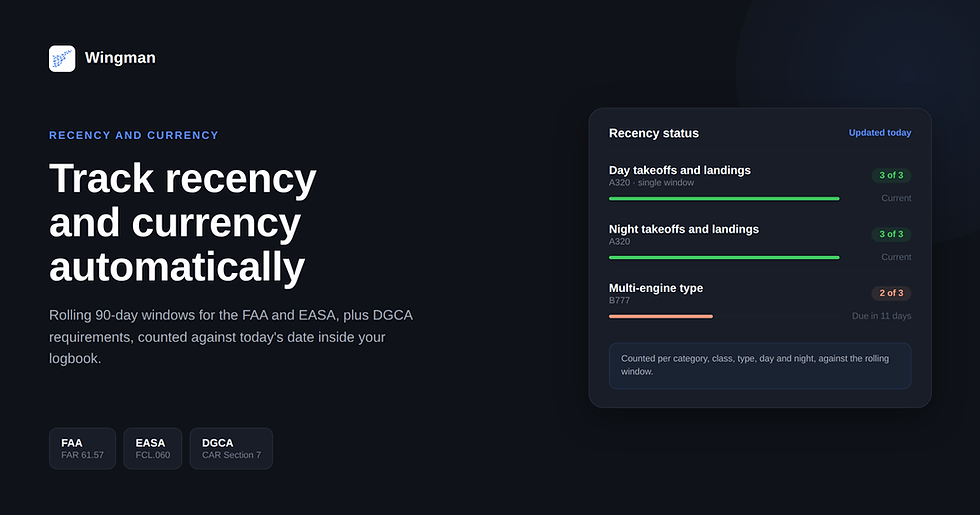
A digital logbook handles that by calculating the look-back window dynamically against the current date. Every qualifying takeoff and landing is already recorded. The system counts the qualifying events that fall inside the rolling window relative to today, tells you how many you have against how many you need, and shows the date the oldest qualifying event ages out. Because the count is anchored to today rather than to a date you typed in once, the status updates on its own as the calendar advances. You do not re-run anything.
The calculation also has to respect the distinctions that make recency specific to what you actually fly. Day and night are counted separately. Category and class are kept apart. Single-engine and multi-engine are not pooled. Where a type rating applies, the count is per type. The result is a set of individual recency states rather than one combined figure, which is the only way the number can mean anything operationally.
Where manual spreadsheet tracking breaks
Spreadsheets fail at recency in predictable ways, and none of them are exotic:
The window moves but the sheet does not. A spreadsheet only recalculates when you open it and remember to look. The window keeps moving whether you look or not.
A fixed date instead of a live one. If a formula references a typed date rather than today's date, it stops aging events out and quietly reports a state that was true last month.
Day and night collapsed into one column. A pilot reads "current" off a single total while night recency has already lapsed inside it.
Type and category pooled. Currency on one aircraft is read as currency on another because the sheet never separated them.
One device, one copy. The sheet is out of date the moment a flight is logged somewhere else, and there is no second source to catch it.
These are the ordinary failure modes of a tool that does not recalculate itself. The spreadsheet is not wrong on the day you build it. It is wrong on every day after that, by the amount the calendar has moved.
How Wingman surfaces recency status

Wingman keeps recency status visible inside Wingman's logbook dashboard rather than leaving you to query it. Each recency item shows its current count against the required count, the date the requirement was last satisfied, and how long until the oldest qualifying event ages out of the window. Because the calculation runs against the current date, the dashboard reflects today's position every time you open the logbook.
That gives you two ways to read your standing. The passive view is the dashboard itself: open it and the current state is already calculated, with nothing to recompute. The second is the flag that appears when an item is approaching the edge of its window, so an item that is close to lapsing reads differently from one that is comfortably inside it. The status is surfaced in the app against your logged flights, which keeps it tied to the same record you would use to prove recency in the first place.
Because day, night, category, class, and type are tracked as separate items, the dashboard shows you which specific recency states are current and which are not, rather than a single pass or fail. That is the level of detail recency actually operates at.
A practical workflow: logging a flight and watching currency update
The point of automatic tracking is that the work happens as a by-product of logging, not as a separate task. The flow below shows what happens from operating a sector to seeing your recency state move.

The sequence is short. You operate the sector, the flight reaches your logbook through manual entry or roster import, and the recency count for that category, class, and type moves on its own. The dashboard then shows where you stand against today's date. The state moved because the record moved, not because you recomputed it.
FAQ
What is the FAA 90-day recency rule, and does it apply to all pilots?
FAR 61.57 requires three takeoffs and landings within the preceding 90 days to act as pilot in command carrying passengers, with a separate night currency requirement in the same window. It applies to pilots acting as pilot in command carrying passengers under the FAA, and the qualifying takeoffs and landings have to be in an aircraft of the appropriate category, class, and type. Operations outside that scope are governed by their own rules, so the 90-day passenger-carrying requirement is one specific rule rather than a single rule covering every situation.
How is EASA recent experience different from FAA currency?
The headline window is the same at 90 days, but the conditions differ. EASA FCL.060 frames the requirement around three takeoffs and three landings as pilot flying, and it covers both pilot in command and co-pilot carrying passengers. The FAA passenger-carrying requirement is framed around pilot in command. A pilot holding both licences tracks two separate states even though the day count matches.
What happens if I let my recency lapse, can I still log the hours?
Logging and recency are two different things. The hours you have already flown stay in your logbook regardless of your recency status, because the logbook is a record of what happened. What lapses is your privilege to carry passengers under that recency rule until you complete the qualifying takeoffs and landings again. The record does not disappear, but the privilege is paused until you bring the count back inside the window.
Does a simulator session count toward recency under FAA or EASA rules?
Whether a simulator or training device session counts depends on the specific rule and the conditions attached to it, and it is not uniform across regulators or across every recency requirement. Read the regulation that applies to your licence and the device qualification rather than assuming a session counts. Record the session in your logbook either way, so that if it does qualify, the evidence is already there.
How does a digital logbook track recency automatically?
It calculates the look-back window against the current date. Each qualifying takeoff and landing is already recorded, so the system counts the events inside the rolling window relative to today, reports the count against the requirement, and shows when the oldest qualifying event ages out. Because the count is anchored to today, the status updates as the calendar moves without you re-running it, and it is kept separate by category, class, type, and day or night.
Does recency reset from the date of the last qualifying flight or the last passenger-carrying flight?
Recency is measured against your qualifying takeoffs and landings inside the rolling window, not against the date you last carried passengers. What matters is whether the required number of qualifying events fall inside the look-back window counted back from today. A flight that carried passengers but did not add qualifying takeoffs and landings does not extend the count, and a positioning or training sector that did add them can.
Keeping recency off your worry list
Recency is a small calculation that has to be right on a day you may not be thinking about it. Done by hand, it depends on you remembering to recount against a window that never stops moving. Done by the logbook, it becomes a state you can read rather than a sum you have to redo.
Wingman tracks your recency automatically across FAA, EASA, and DGCA requirements. Start free.


Comments